

Introduction
The Verification Center is an embeddable iframe that displays the status of Tinfoil’s enclave verification process. It shows users the cryptographic proof that their data is being processed in a verified secure enclave. You can see it live at chat.tinfoil.sh. This guide covers how to embed the Verification Center in your web application and feed it verification data from the Tinfoil JavaScript SDK.Verification States
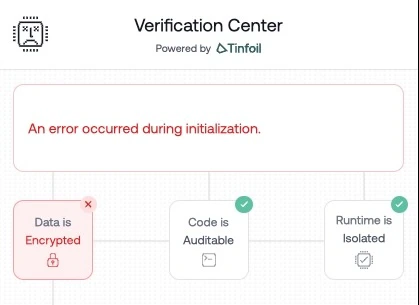
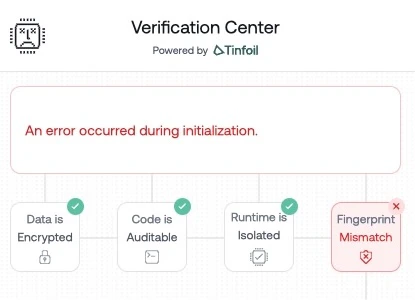
The Verification Center displays different states based on the verification results:- Success
- HPKE Key Mismatch
- Fingerprint Mismatch
When all verification steps pass, users see confirmation that their data is protected: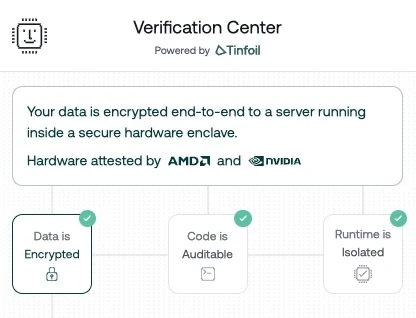
Prerequisites
Install the Tinfoil JavaScript SDK:Basic Integration
The integration involves two parts: embedding the iframe and sending it verification data from the SDK.1. Add the Iframe
2. Send Verification Data
Use the Tinfoil SDK to get the verification document and send it to the iframe viapostMessage. You can use either TinfoilAI (OpenAI-compatible) or SecureClient (low-level):
- TinfoilAI
- SecureClient
URL Parameters
The Verification Center accepts these query parameters:
Example with dark mode enabled:
PostMessage API
The Verification Center communicates with its parent window using thepostMessage API.
Messages from the Iframe
Listen for these messages from the Verification Center:Messages to the Iframe
Send verification data to the iframe:Complete Example
Here’s a complete integration with a sidebar layout:- TinfoilAI
- SecureClient
Understanding the Verification Document
The verification document contains the results of the three-step verification process:securityVerified field indicates whether all verification steps passed. Individual step statuses are available in the steps object for granular status display.
The getVerificationDocument() method is available on both TinfoilAI and SecureClient. On TinfoilAI it returns a promise; on SecureClient it returns synchronously after ready() has resolved.
React Integration
For React applications, create a component that manages the iframe lifecycle:- TinfoilAI
- SecureClient
Next Steps
JavaScript SDK
Full SDK documentation for TinfoilAI and SecureClient
How Verification Works
Understanding the three-step verification process