> ## Documentation Index
> Fetch the complete documentation index at: https://docs.tinfoil.sh/llms.txt
> Use this file to discover all available pages before exploring further.

# Verification center UI

> Add Tinfoil's verification center to your application to display real-time enclave verification status to users.

## Introduction

The Verification Center is an embeddable iframe that displays the status of Tinfoil's enclave verification process. It shows users the cryptographic proof that their data is being processed in a verified secure enclave. You can see it live at [chat.tinfoil.sh](https://chat.tinfoil.sh).

This guide covers how to embed the Verification Center in your web application and feed it verification data from the Tinfoil JavaScript SDK.

## Verification States

The Verification Center displays different states based on the verification results:

<Tabs>
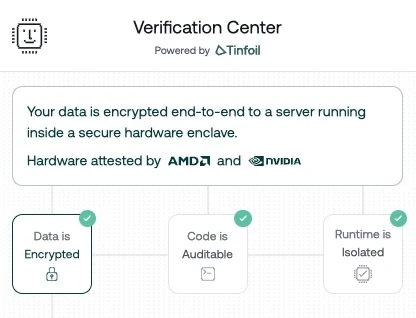
  <Tab title="Success">
    When all verification steps pass, users see confirmation that their data is protected:

    <div style={{ textAlign: "center" }}>
      <img style={{ maxWidth: "400px" }} src="https://mintcdn.com/tinfoil/0iSJs_AKHorh3tQ5/images/verification-center-success.jpg?fit=max&auto=format&n=0iSJs_AKHorh3tQ5&q=85&s=7925b6044c26ff3aa5015decb56795dc" alt="Verification Center showing successful verification" width="416" height="318" data-path="images/verification-center-success.jpg" />
    </div>
  </Tab>

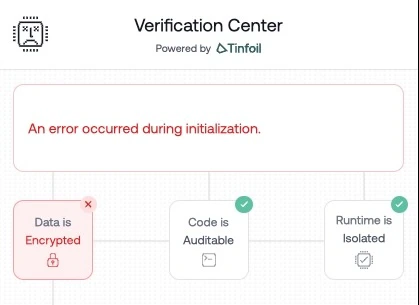
  <Tab title="HPKE Key Mismatch">
    If the HPKE public key doesn't match the expected value from the enclave attestation, encryption cannot be trusted:

    <div style={{ textAlign: "center" }}>
      <img style={{ maxWidth: "400px" }} src="https://mintcdn.com/tinfoil/0iSJs_AKHorh3tQ5/images/verification-center-error-hpke-key-mismatch.jpg?fit=max&auto=format&n=0iSJs_AKHorh3tQ5&q=85&s=62563e7e03b8f0f5f6dcc6f0641e1981" alt="Verification Center showing HPKE key mismatch error" width="419" height="305" data-path="images/verification-center-error-hpke-key-mismatch.jpg" />
    </div>
  </Tab>

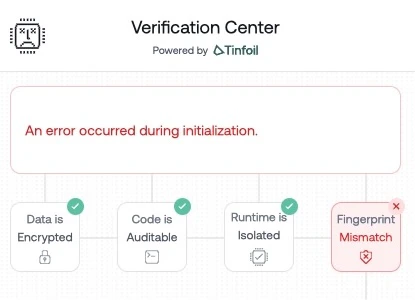
  <Tab title="Fingerprint Mismatch">
    If the code fingerprint doesn't match the enclave fingerprint, the enclave may not be running the expected code:

    <div style={{ textAlign: "center" }}>
      <img style={{ maxWidth: "400px" }} src="https://mintcdn.com/tinfoil/0iSJs_AKHorh3tQ5/images/verification-center-error-fingerprint-mismatch.jpg?fit=max&auto=format&n=0iSJs_AKHorh3tQ5&q=85&s=63e930f88df16253af0405af544b12e2" alt="Verification Center showing fingerprint mismatch error" width="415" height="300" data-path="images/verification-center-error-fingerprint-mismatch.jpg" />
    </div>
  </Tab>
</Tabs>

## Prerequisites

Install the Tinfoil JavaScript SDK:

```bash theme={"dark"}
npm install tinfoil
```

## Basic Integration

The integration involves two parts: embedding the iframe and sending it verification data from the SDK.

### 1. Add the Iframe

```html theme={"dark"}
<iframe
  id="tinfoil-verification"
  src="https://verification-center.tinfoil.sh"
  style="width: 420px; height: 100vh; border: none;"
  title="Tinfoil Verification Center"
></iframe>
```

### 2. Send Verification Data

Use the Tinfoil SDK to get the verification document and send it to the iframe via `postMessage`. You can use either `TinfoilAI` (OpenAI-compatible) or `SecureClient` (low-level):

<Tabs>
  <Tab title="TinfoilAI">
    ```typescript theme={"dark"}
    import { TinfoilAI } from "tinfoil";

    const client = new TinfoilAI({ apiKey: "<YOUR_API_KEY>" });
    await client.ready();

    const verificationDoc = await client.getVerificationDocument();
    const iframe = document.getElementById("tinfoil-verification") as HTMLIFrameElement;

    // Wait for the iframe to signal it's ready
    window.addEventListener("message", (event) => {
      if (event.origin !== "https://verification-center.tinfoil.sh") return;

      if (event.data.type === "TINFOIL_VERIFICATION_CENTER_READY") {
        iframe.contentWindow?.postMessage(
          {
            type: "TINFOIL_VERIFICATION_DOCUMENT",
            document: verificationDoc,
          },
          "https://verification-center.tinfoil.sh"
        );
      }
    });
    ```
  </Tab>

  <Tab title="SecureClient">
    ```typescript theme={"dark"}
    import { SecureClient } from "tinfoil";

    const client = new SecureClient({
      enclaveURL: "https://<CONTAINER_URL>",
      configRepo: "<CONFIG_REPO>",
    });

    await client.ready();

    const verificationDoc = client.getVerificationDocument();
    const iframe = document.getElementById("tinfoil-verification") as HTMLIFrameElement;

    // Wait for the iframe to signal it's ready
    window.addEventListener("message", (event) => {
      if (event.origin !== "https://verification-center.tinfoil.sh") return;

      if (event.data.type === "TINFOIL_VERIFICATION_CENTER_READY") {
        iframe.contentWindow?.postMessage(
          {
            type: "TINFOIL_VERIFICATION_DOCUMENT",
            document: verificationDoc,
          },
          "https://verification-center.tinfoil.sh"
        );
      }
    });
    ```
  </Tab>
</Tabs>

## URL Parameters

The Verification Center accepts these query parameters:

| Parameter    | Type    | Default | Description             |
| ------------ | ------- | ------- | ----------------------- |
| `darkMode`   | boolean | `false` | Enable dark theme       |
| `showHeader` | boolean | `true`  | Show or hide the header |

Example with dark mode enabled:

```html theme={"dark"}
<iframe
  src="https://verification-center.tinfoil.sh?darkMode=true&showHeader=true"
  style="width: 420px; height: 100vh; border: none;"
  title="Tinfoil Verification Center"
></iframe>
```

## PostMessage API

The Verification Center communicates with its parent window using the `postMessage` API.

### Messages from the Iframe

Listen for these messages from the Verification Center:

```typescript theme={"dark"}
window.addEventListener("message", (event) => {
  // Only handle messages from the Verification Center
  if (event.origin !== "https://verification-center.tinfoil.sh") return;

  switch (event.data.type) {
    case "TINFOIL_VERIFICATION_CENTER_READY":
      // Iframe is ready to receive verification data
      break;
    case "TINFOIL_REQUEST_VERIFICATION_DOCUMENT":
      // Iframe is requesting a fresh verification document
      break;
  }
});
```

### Messages to the Iframe

Send verification data to the iframe:

```typescript theme={"dark"}
iframe.contentWindow?.postMessage(
  {
    type: "TINFOIL_VERIFICATION_DOCUMENT",
    document: verificationDoc,
  },
  "https://verification-center.tinfoil.sh"
);
```

## Complete Example

Here's a complete integration with a sidebar layout:

<Tabs>
  <Tab title="TinfoilAI">
    ```html theme={"dark"}
    <!DOCTYPE html>
    <html>
    <head>
      <style>
        .verification-sidebar {
          position: fixed;
          right: 0;
          top: 0;
          width: 420px;
          height: 100vh;
          transform: translateX(100%);
          transition: transform 200ms ease-in-out;
          border-left: 1px solid #e5e7eb;
          background: white;
          z-index: 40;
        }
        .verification-sidebar.open {
          transform: translateX(0);
        }
        .verification-sidebar iframe {
          width: 100%;
          height: 100%;
          border: none;
        }
      </style>
    </head>
    <body>
      <button id="verify-btn">Show Verification</button>

      <div id="sidebar" class="verification-sidebar">
        <iframe
          id="tinfoil-verification"
          src="https://verification-center.tinfoil.sh?darkMode=false&showHeader=true"
          title="Tinfoil Verification Center"
        ></iframe>
      </div>

      <script type="module">
        import { TinfoilAI } from "tinfoil";

        const iframe = document.getElementById("tinfoil-verification");
        const sidebar = document.getElementById("sidebar");
        const button = document.getElementById("verify-btn");

        let verificationDoc = null;
        let iframeReady = false;

        const client = new TinfoilAI({ apiKey: "<YOUR_API_KEY>" });

        async function initialize() {
          await client.ready();
          verificationDoc = await client.getVerificationDocument();

          if (iframeReady) {
            sendVerificationDocument();
          }
        }

        const VERIFICATION_CENTER_ORIGIN = "https://verification-center.tinfoil.sh";

        function sendVerificationDocument() {
          if (verificationDoc && iframe.contentWindow) {
            iframe.contentWindow.postMessage(
              {
                type: "TINFOIL_VERIFICATION_DOCUMENT",
                document: verificationDoc,
              },
              VERIFICATION_CENTER_ORIGIN
            );
          }
        }

        window.addEventListener("message", (event) => {
          if (event.origin !== VERIFICATION_CENTER_ORIGIN) return;

          if (event.data.type === "TINFOIL_VERIFICATION_CENTER_READY") {
            iframeReady = true;
            sendVerificationDocument();
          }

          if (event.data.type === "TINFOIL_REQUEST_VERIFICATION_DOCUMENT") {
            sendVerificationDocument();
          }
        });

        button.addEventListener("click", () => {
          sidebar.classList.toggle("open");
        });

        initialize();
      </script>
    </body>
    </html>
    ```
  </Tab>

  <Tab title="SecureClient">
    ```html theme={"dark"}
    <!DOCTYPE html>
    <html>
    <head>
      <style>
        .verification-sidebar {
          position: fixed;
          right: 0;
          top: 0;
          width: 420px;
          height: 100vh;
          transform: translateX(100%);
          transition: transform 200ms ease-in-out;
          border-left: 1px solid #e5e7eb;
          background: white;
          z-index: 40;
        }
        .verification-sidebar.open {
          transform: translateX(0);
        }
        .verification-sidebar iframe {
          width: 100%;
          height: 100%;
          border: none;
        }
      </style>
    </head>
    <body>
      <button id="verify-btn">Show Verification</button>

      <div id="sidebar" class="verification-sidebar">
        <iframe
          id="tinfoil-verification"
          src="https://verification-center.tinfoil.sh?darkMode=false&showHeader=true"
          title="Tinfoil Verification Center"
        ></iframe>
      </div>

      <script type="module">
        import { SecureClient } from "tinfoil";

        const iframe = document.getElementById("tinfoil-verification");
        const sidebar = document.getElementById("sidebar");
        const button = document.getElementById("verify-btn");

        let verificationDoc = null;
        let iframeReady = false;

        const client = new SecureClient({
          enclaveURL: "https://<CONTAINER_URL>",
          configRepo: "<CONFIG_REPO>",
        });

        async function initialize() {
          await client.ready();
          verificationDoc = client.getVerificationDocument();

          if (iframeReady) {
            sendVerificationDocument();
          }
        }

        const VERIFICATION_CENTER_ORIGIN = "https://verification-center.tinfoil.sh";

        function sendVerificationDocument() {
          if (verificationDoc && iframe.contentWindow) {
            iframe.contentWindow.postMessage(
              {
                type: "TINFOIL_VERIFICATION_DOCUMENT",
                document: verificationDoc,
              },
              VERIFICATION_CENTER_ORIGIN
            );
          }
        }

        window.addEventListener("message", (event) => {
          if (event.origin !== VERIFICATION_CENTER_ORIGIN) return;

          if (event.data.type === "TINFOIL_VERIFICATION_CENTER_READY") {
            iframeReady = true;
            sendVerificationDocument();
          }

          if (event.data.type === "TINFOIL_REQUEST_VERIFICATION_DOCUMENT") {
            sendVerificationDocument();
          }
        });

        button.addEventListener("click", () => {
          sidebar.classList.toggle("open");
        });

        initialize();
      </script>
    </body>
    </html>
    ```
  </Tab>
</Tabs>

## Understanding the Verification Document

The verification document contains the results of the three-step verification process:

```typescript theme={"dark"}
interface VerificationDocument {
  // Repository and enclave information
  configRepo: string;           // GitHub repo (e.g., "tinfoilsh/confidential-gpt-oss-120b")
  enclaveHost: string;          // Enclave hostname
  releaseDigest: string;        // SHA256 digest of the release

  // Cryptographic measurements
  codeMeasurement: object;      // Measurement from Sigstore verification
  enclaveMeasurement: object;   // Measurement from enclave attestation
  codeFingerprint: string;      // SHA-256 fingerprint of code
  enclaveFingerprint: string;   // SHA-256 fingerprint of enclave

  // Verification status
  securityVerified: boolean;    // True if all checks passed
  steps: {
    fetchDigest: StepState;
    verifyCode: StepState;
    verifyEnclave: StepState;
    compareMeasurements: StepState;
    verifyCertificate: StepState;
  };
}

interface StepState {
  status: "pending" | "success" | "failed";
  error?: string;
}
```

The `securityVerified` field indicates whether all verification steps passed. Individual step statuses are available in the `steps` object for granular status display.

The `getVerificationDocument()` method is available on both `TinfoilAI` and `SecureClient`. On `TinfoilAI` it returns a promise; on `SecureClient` it returns synchronously after `ready()` has resolved.

## React Integration

For React applications, create a component that manages the iframe lifecycle:

<Tabs>
  <Tab title="TinfoilAI">
    ```tsx theme={"dark"}
    import { useEffect, useRef, useState } from "react";
    import { TinfoilAI } from "tinfoil";

    interface VerificationCenterProps {
      apiKey: string;
      darkMode?: boolean;
      showHeader?: boolean;
    }

    export function VerificationCenter({
      apiKey,
      darkMode = false,
      showHeader = true,
    }: VerificationCenterProps) {
      const iframeRef = useRef<HTMLIFrameElement>(null);
      const [verificationDoc, setVerificationDoc] = useState(null);
      const [iframeReady, setIframeReady] = useState(false);

      const iframeUrl = `https://verification-center.tinfoil.sh?darkMode=${darkMode}&showHeader=${showHeader}`;
      const VERIFICATION_CENTER_ORIGIN = "https://verification-center.tinfoil.sh";

      useEffect(() => {
        const client = new TinfoilAI({ apiKey });

        async function initialize() {
          await client.ready();
          const doc = await client.getVerificationDocument();
          setVerificationDoc(doc);
        }

        initialize();
      }, [apiKey]);

      useEffect(() => {
        if (iframeReady && verificationDoc && iframeRef.current?.contentWindow) {
          iframeRef.current.contentWindow.postMessage(
            {
              type: "TINFOIL_VERIFICATION_DOCUMENT",
              document: verificationDoc,
            },
            VERIFICATION_CENTER_ORIGIN
          );
        }
      }, [iframeReady, verificationDoc]);

      useEffect(() => {
        function handleMessage(event: MessageEvent) {
          if (event.origin !== VERIFICATION_CENTER_ORIGIN) return;

          if (event.data.type === "TINFOIL_VERIFICATION_CENTER_READY") {
            setIframeReady(true);
          }

          if (event.data.type === "TINFOIL_REQUEST_VERIFICATION_DOCUMENT") {
            if (verificationDoc && iframeRef.current?.contentWindow) {
              iframeRef.current.contentWindow.postMessage(
                {
                  type: "TINFOIL_VERIFICATION_DOCUMENT",
                  document: verificationDoc,
                },
                VERIFICATION_CENTER_ORIGIN
              );
            }
          }
        }

        window.addEventListener("message", handleMessage);
        return () => window.removeEventListener("message", handleMessage);
      }, [verificationDoc]);

      return (
        <iframe
          ref={iframeRef}
          src={iframeUrl}
          style={{ width: "420px", height: "100%", border: "none" }}
          title="Tinfoil Verification Center"
        />
      );
    }
    ```
  </Tab>

  <Tab title="SecureClient">
    ```tsx theme={"dark"}
    import { useEffect, useRef, useState } from "react";
    import { SecureClient } from "tinfoil";

    interface VerificationCenterProps {
      enclaveURL: string;
      configRepo: string;
      darkMode?: boolean;
      showHeader?: boolean;
    }

    export function VerificationCenter({
      enclaveURL,
      configRepo,
      darkMode = false,
      showHeader = true,
    }: VerificationCenterProps) {
      const iframeRef = useRef<HTMLIFrameElement>(null);
      const [verificationDoc, setVerificationDoc] = useState(null);
      const [iframeReady, setIframeReady] = useState(false);

      const iframeUrl = `https://verification-center.tinfoil.sh?darkMode=${darkMode}&showHeader=${showHeader}`;
      const VERIFICATION_CENTER_ORIGIN = "https://verification-center.tinfoil.sh";

      useEffect(() => {
        const client = new SecureClient({ enclaveURL, configRepo });

        async function initialize() {
          await client.ready();
          const doc = client.getVerificationDocument();
          setVerificationDoc(doc);
        }

        initialize();
      }, [enclaveURL, configRepo]);

      useEffect(() => {
        if (iframeReady && verificationDoc && iframeRef.current?.contentWindow) {
          iframeRef.current.contentWindow.postMessage(
            {
              type: "TINFOIL_VERIFICATION_DOCUMENT",
              document: verificationDoc,
            },
            VERIFICATION_CENTER_ORIGIN
          );
        }
      }, [iframeReady, verificationDoc]);

      useEffect(() => {
        function handleMessage(event: MessageEvent) {
          if (event.origin !== VERIFICATION_CENTER_ORIGIN) return;

          if (event.data.type === "TINFOIL_VERIFICATION_CENTER_READY") {
            setIframeReady(true);
          }

          if (event.data.type === "TINFOIL_REQUEST_VERIFICATION_DOCUMENT") {
            if (verificationDoc && iframeRef.current?.contentWindow) {
              iframeRef.current.contentWindow.postMessage(
                {
                  type: "TINFOIL_VERIFICATION_DOCUMENT",
                  document: verificationDoc,
                },
                VERIFICATION_CENTER_ORIGIN
              );
            }
          }
        }

        window.addEventListener("message", handleMessage);
        return () => window.removeEventListener("message", handleMessage);
      }, [verificationDoc]);

      return (
        <iframe
          ref={iframeRef}
          src={iframeUrl}
          style={{ width: "420px", height: "100%", border: "none" }}
          title="Tinfoil Verification Center"
        />
      );
    }
    ```
  </Tab>
</Tabs>

## Next Steps

<CardGroup cols={2}>
  <Card title="JavaScript SDK" icon="js" href="/sdk/javascript-sdk">
    Full SDK documentation for TinfoilAI and SecureClient
  </Card>

  <Card title="How Verification Works" icon="shield-check" href="/verification/verification-in-tinfoil">
    Understanding the three-step verification process
  </Card>
</CardGroup>