> ## Documentation Index
> Fetch the complete documentation index at: https://docs.tinfoil.sh/llms.txt
> Use this file to discover all available pages before exploring further.
# Updating & lifecycle
> Update a running container, roll back, cancel, and recover from failures.
## How updates work
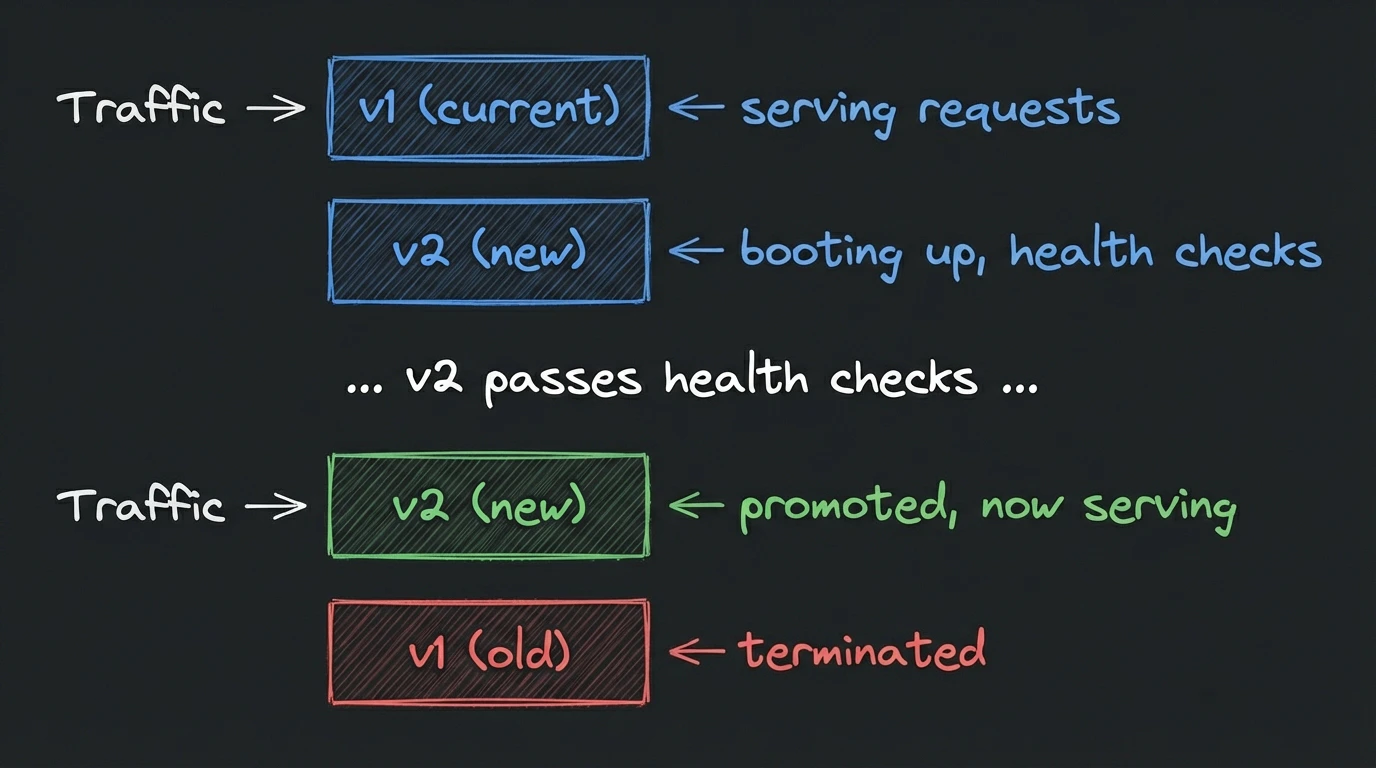
Tinfoil uses a blue-green update strategy: the new version boots alongside the current one, and traffic switches atomically once it reaches **Ready**. If the new version fails health checks, the current one keeps running — no rollback needed mid-update.
 Multi-GPU containers (`gpus: > 1`) can't run two versions simultaneously, so updates for them are not zero-downtime. See [GPU container updates](#gpu-container-updates).
## Starting an update
An update has two stages: publish a deployable release from your config repo, then roll that release out to the running container.
### 1. Publish a release
Choose one of these approaches:
* **Dashboard**: Open the repo from **Containers** → **Repositories**, edit `tinfoil-config.yml`, open and merge the generated pull request, then follow the **Release** steps. See the [quickstart](/containers/quickstart#3-release-a-version) for the full walkthrough.
* **Tinfoil CLI**: Open the config pull request and trigger the release through the installed GitHub App:
```bash theme={"dark"}
tinfoil repo config get owner/repo --raw > tinfoil-config.yml
tinfoil repo config pr owner/repo --file tinfoil-config.yml
tinfoil repo pr status owner/repo 42
# After the pull request is merged
tinfoil repo build info owner/repo
tinfoil repo build run owner/repo --version v1.2.4
```
* **GitHub directly**: Commit the config change, then run:
```bash theme={"dark"}
gh workflow run tinfoil-release.yml -f version=v1.2.4
```
You can also use **Actions** → **Tinfoil Release** → **Run workflow** in the GitHub UI.
Wait for both release workflow phases to finish. `repo build run` prints the GitHub Actions URL where you can follow their status. If either fails, the tag is not deployable.
### 2. Roll out the release
In the dashboard, click **Update** on the container and select the new tag. From the CLI, run:
```bash theme={"dark"}
tinfoil container relaunch my-api --tag v1.2.4
```
Publishing a release does not change a running container. The rollout starts only when you select the release in the dashboard or run `container relaunch`.
## Updating a deployment
A deployment groups all container instances in your organization that use the same config repository. Update every eligible instance to one tag with:
```bash theme={"dark"}
tinfoil deployment update owner/repo --tag v1.2.4
```
To update only selected instances, repeat `--instance` with their container UUIDs:
```bash theme={"dark"}
tinfoil deployment update owner/repo \
--tag v1.2.4 \
--instance 550e8400-e29b-41d4-a716-446655440000
```
Deployment updates use the default staging setting. Override it for one rollout with `--staging true` or `--staging false`.
Only running or failed instances are eligible. Instances in any other state, or already updating, are skipped. The CLI reports each result and exits non-zero if any selected instance is skipped or fails.
### Update statuses
The container's deployment status describes the version currently serving traffic. During a blue-green update, the update candidate has a separate status:
| Status | Meaning |
| ----------- | ----------------------------------------------------------- |
| **Pending** | New version is being deployed |
| **Started** | New version's enclave is running, health checks in progress |
| **Ready** | New version is healthy and ready to accept traffic |
| **Failed** | New version failed to start |
## Multi-container configs
If one `tinfoil-config.yml` defines multiple processes in its `containers` section, they run in the same enclave and update together. This is separate from a deployment containing multiple independently deployed container instances.
## Rolling back
To revert to a previous version, click **Update**, pick an older Git tag, and confirm. It's the same blue-green flow — the current version keeps serving until the older version is ready.
## Canceling an in-progress update
Click **Cancel Update** to stop the new version and keep the current one running. The new enclave is torn down and no traffic switches.
## GPU container updates
Single-GPU containers use the blue-green flow like CPU containers.
Multi-GPU containers (`gpus: > 1`) use all available GPUs on the host, so there are no free GPUs to run a second copy. Updates stop the current deployment before starting the new one, which means **there is downtime** — typically while the new enclave boots and loads your model. DNS records are kept in place during the transition so clients reconnect automatically once the new version is ready.
If a multi-GPU update fails, the container is left in a failed state and you can retry or redeploy.
## Redeploying without a new tag
To re-launch a container with modified secrets or config, click **Update** and select **Edit config**. The modal opens pre-populated with the container's current config. You can change settings before submitting. The redeployment uses the same blue-green strategy.
This is also how you pick up [updated secret values](/containers/secrets-and-env-vars#updating) — the dashboard shows a stale secrets indicator when a redeploy is needed.
## Recovering from a failed update
* **New version fails health checks**: click **Cancel Update**. Deploy a [debug mode](/containers/debug-mode) instance with the new tag to investigate, fix the issue, then retry the update.
* **Update stuck in Pending or Started**: the new version follows the same lifecycle as a fresh deployment — see [instance troubleshooting](/containers/troubleshooting#instance-failures).
## Using the CLI
```bash theme={"dark"}
# Trigger a blue-green update with a new tag or config
tinfoil container relaunch my-api --tag v1.2.4
tinfoil container relaunch my-api --variable LOG_LEVEL=debug
# Roll back through the same update flow
tinfoil container relaunch my-api --tag v1.2.3
# Update every eligible instance that uses a repository
tinfoil deployment update owner/repo --tag v1.2.4
# Inspect or control an in-progress update
tinfoil container update status my-api
tinfoil container update accept my-api # promote a "ready" candidate (staging)
tinfoil container update cancel my-api # discard, keep current version
```
See the [CLI reference](/containers/cli#lifecycle) for all flags.
Multi-GPU containers (`gpus: > 1`) can't run two versions simultaneously, so updates for them are not zero-downtime. See [GPU container updates](#gpu-container-updates).
## Starting an update
An update has two stages: publish a deployable release from your config repo, then roll that release out to the running container.
### 1. Publish a release
Choose one of these approaches:
* **Dashboard**: Open the repo from **Containers** → **Repositories**, edit `tinfoil-config.yml`, open and merge the generated pull request, then follow the **Release** steps. See the [quickstart](/containers/quickstart#3-release-a-version) for the full walkthrough.
* **Tinfoil CLI**: Open the config pull request and trigger the release through the installed GitHub App:
```bash theme={"dark"}
tinfoil repo config get owner/repo --raw > tinfoil-config.yml
tinfoil repo config pr owner/repo --file tinfoil-config.yml
tinfoil repo pr status owner/repo 42
# After the pull request is merged
tinfoil repo build info owner/repo
tinfoil repo build run owner/repo --version v1.2.4
```
* **GitHub directly**: Commit the config change, then run:
```bash theme={"dark"}
gh workflow run tinfoil-release.yml -f version=v1.2.4
```
You can also use **Actions** → **Tinfoil Release** → **Run workflow** in the GitHub UI.
Wait for both release workflow phases to finish. `repo build run` prints the GitHub Actions URL where you can follow their status. If either fails, the tag is not deployable.
### 2. Roll out the release
In the dashboard, click **Update** on the container and select the new tag. From the CLI, run:
```bash theme={"dark"}
tinfoil container relaunch my-api --tag v1.2.4
```
Publishing a release does not change a running container. The rollout starts only when you select the release in the dashboard or run `container relaunch`.
## Updating a deployment
A deployment groups all container instances in your organization that use the same config repository. Update every eligible instance to one tag with:
```bash theme={"dark"}
tinfoil deployment update owner/repo --tag v1.2.4
```
To update only selected instances, repeat `--instance` with their container UUIDs:
```bash theme={"dark"}
tinfoil deployment update owner/repo \
--tag v1.2.4 \
--instance 550e8400-e29b-41d4-a716-446655440000
```
Deployment updates use the default staging setting. Override it for one rollout with `--staging true` or `--staging false`.
Only running or failed instances are eligible. Instances in any other state, or already updating, are skipped. The CLI reports each result and exits non-zero if any selected instance is skipped or fails.
### Update statuses
The container's deployment status describes the version currently serving traffic. During a blue-green update, the update candidate has a separate status:
| Status | Meaning |
| ----------- | ----------------------------------------------------------- |
| **Pending** | New version is being deployed |
| **Started** | New version's enclave is running, health checks in progress |
| **Ready** | New version is healthy and ready to accept traffic |
| **Failed** | New version failed to start |
## Multi-container configs
If one `tinfoil-config.yml` defines multiple processes in its `containers` section, they run in the same enclave and update together. This is separate from a deployment containing multiple independently deployed container instances.
## Rolling back
To revert to a previous version, click **Update**, pick an older Git tag, and confirm. It's the same blue-green flow — the current version keeps serving until the older version is ready.
## Canceling an in-progress update
Click **Cancel Update** to stop the new version and keep the current one running. The new enclave is torn down and no traffic switches.
## GPU container updates
Single-GPU containers use the blue-green flow like CPU containers.
Multi-GPU containers (`gpus: > 1`) use all available GPUs on the host, so there are no free GPUs to run a second copy. Updates stop the current deployment before starting the new one, which means **there is downtime** — typically while the new enclave boots and loads your model. DNS records are kept in place during the transition so clients reconnect automatically once the new version is ready.
If a multi-GPU update fails, the container is left in a failed state and you can retry or redeploy.
## Redeploying without a new tag
To re-launch a container with modified secrets or config, click **Update** and select **Edit config**. The modal opens pre-populated with the container's current config. You can change settings before submitting. The redeployment uses the same blue-green strategy.
This is also how you pick up [updated secret values](/containers/secrets-and-env-vars#updating) — the dashboard shows a stale secrets indicator when a redeploy is needed.
## Recovering from a failed update
* **New version fails health checks**: click **Cancel Update**. Deploy a [debug mode](/containers/debug-mode) instance with the new tag to investigate, fix the issue, then retry the update.
* **Update stuck in Pending or Started**: the new version follows the same lifecycle as a fresh deployment — see [instance troubleshooting](/containers/troubleshooting#instance-failures).
## Using the CLI
```bash theme={"dark"}
# Trigger a blue-green update with a new tag or config
tinfoil container relaunch my-api --tag v1.2.4
tinfoil container relaunch my-api --variable LOG_LEVEL=debug
# Roll back through the same update flow
tinfoil container relaunch my-api --tag v1.2.3
# Update every eligible instance that uses a repository
tinfoil deployment update owner/repo --tag v1.2.4
# Inspect or control an in-progress update
tinfoil container update status my-api
tinfoil container update accept my-api # promote a "ready" candidate (staging)
tinfoil container update cancel my-api # discard, keep current version
```
See the [CLI reference](/containers/cli#lifecycle) for all flags.