> ## Documentation Index
> Fetch the complete documentation index at: https://docs.tinfoil.sh/llms.txt
> Use this file to discover all available pages before exploring further.
# Container projects
> A project groups the instances that share one config repository.
## What a project is
A **project** is the group of instances in one organization that share a config repository. It stores shared settings and gives the dashboard and CLI one place to inspect or update its instances together.
Think of the distinction between a [Fly App and its Machines](https://fly.io/docs/apps/overview/): the project is the group; an instance is an independently managed unit. [Docker Compose also uses a project to group resources](https://docs.docker.com/compose/intro/compose-application-model/), but a Tinfoil instance can itself run multiple application containers inside one enclave. These are naming parallels, not equivalent networking or scaling models.
## Creating a project
A project is created implicitly when you create the first instance from a repository, or create its project-secret namespace. There is no separate `tinfoil project create` step. Use `tinfoil container create` to create an instance, not to import source code.
A config repository discovered through the GitHub App is a **source**, not proof that you have a managed project or a running instance. The project is the home for its instances and shared settings; the source editor manages config PRs and releases. Publishing a source release does not deploy it.
In **Containers** → **Projects**, the **Container projects** page lists managed projects separately from **Available configurations**. **Set up project** guides you through source setup; the group itself appears after its first instance or project secret. Open a project to inspect its instances, source connection, hold default, secrets, and releases. To create from a published tag, choose **Create instance from this release** beside that tag.
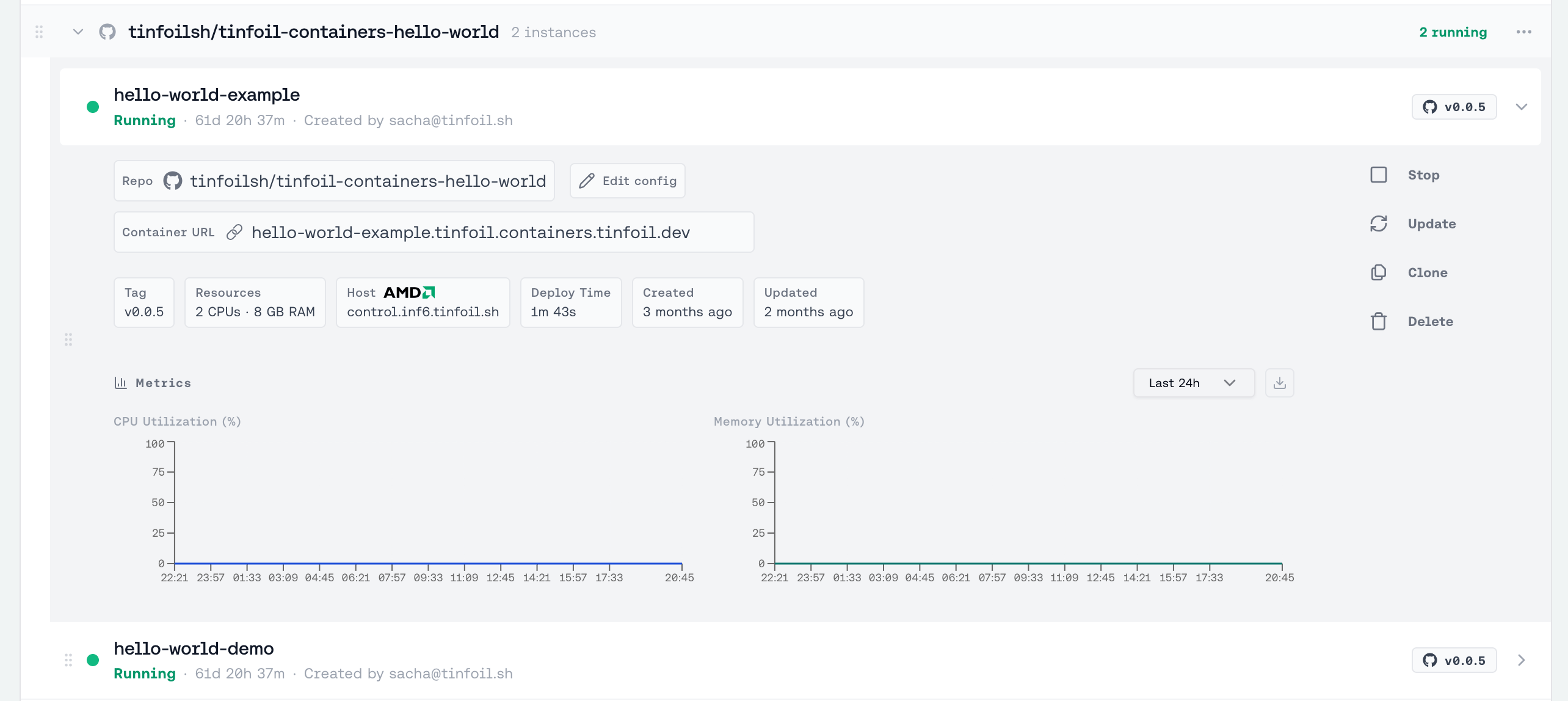
 Each **instance** in a project is an independent enclave with its own name, status, resources, domain, and lifecycle. A project does not add load balancing or automatically update its instances when a release is published. The dashboard shows each project with aggregate counts for running, deploying, failed, and stopped instances.
 Project secrets belong to this namespace. They are available only to instances of that project and move with it when the repository is renamed. If Tinfoil merges an existing destination namespace for the same repository, resolve duplicate secret names before the rename can complete. A destination belonging to a different repository is isolated and never merged.
## Inspecting a project
Use either the project UUID or its `owner/repo` name:
```bash theme={"dark"}
tinfoil project list
tinfoil project get owner/repo
```
Pass `-o json` for machine-readable output.
## Project settings
To hold new versions for review by default on every update of this project:
```bash theme={"dark"}
tinfoil project settings owner/repo --hold-by-default=true
```
New projects start with `hold_by_default=false`. Individual instance updates, edited-config updates, and batch project updates inherit it. An explicit `--hold=true` or `--hold=false` overrides it for that operation only, without changing the project setting. Creates and deploys are never held. See [Holding an update for review](/containers/hold-for-review).
Manage secrets for the same project from its **Project secrets** section under **Containers** → **Projects** in the dashboard. See [Secrets & environment variables](/containers/secrets-and-env-vars) for scope and naming rules.
## Updating every instance
See [Updating](/containers/updates#updating-a-project) to update every instance, or a selected set, to the same release.
## Creating another instance
Open the project's menu in the dashboard and choose **New instance from this config**, or run `tinfoil container create` with the same `--repo`. Each instance is managed on its own; there is no shared endpoint across instances.
This documentation is built and hosted on [Mintlify](https://mintlify.com), a developer documentation platform.
Project secrets belong to this namespace. They are available only to instances of that project and move with it when the repository is renamed. If Tinfoil merges an existing destination namespace for the same repository, resolve duplicate secret names before the rename can complete. A destination belonging to a different repository is isolated and never merged.
## Inspecting a project
Use either the project UUID or its `owner/repo` name:
```bash theme={"dark"}
tinfoil project list
tinfoil project get owner/repo
```
Pass `-o json` for machine-readable output.
## Project settings
To hold new versions for review by default on every update of this project:
```bash theme={"dark"}
tinfoil project settings owner/repo --hold-by-default=true
```
New projects start with `hold_by_default=false`. Individual instance updates, edited-config updates, and batch project updates inherit it. An explicit `--hold=true` or `--hold=false` overrides it for that operation only, without changing the project setting. Creates and deploys are never held. See [Holding an update for review](/containers/hold-for-review).
Manage secrets for the same project from its **Project secrets** section under **Containers** → **Projects** in the dashboard. See [Secrets & environment variables](/containers/secrets-and-env-vars) for scope and naming rules.
## Updating every instance
See [Updating](/containers/updates#updating-a-project) to update every instance, or a selected set, to the same release.
## Creating another instance
Open the project's menu in the dashboard and choose **New instance from this config**, or run `tinfoil container create` with the same `--repo`. Each instance is managed on its own; there is no shared endpoint across instances.
This documentation is built and hosted on [Mintlify](https://mintlify.com), a developer documentation platform.