> ## Documentation Index
> Fetch the complete documentation index at: https://docs.tinfoil.sh/llms.txt
> Use this file to discover all available pages before exploring further.
# Deployment lifecycle
> Manage deployments and their container instances.
## Deployments
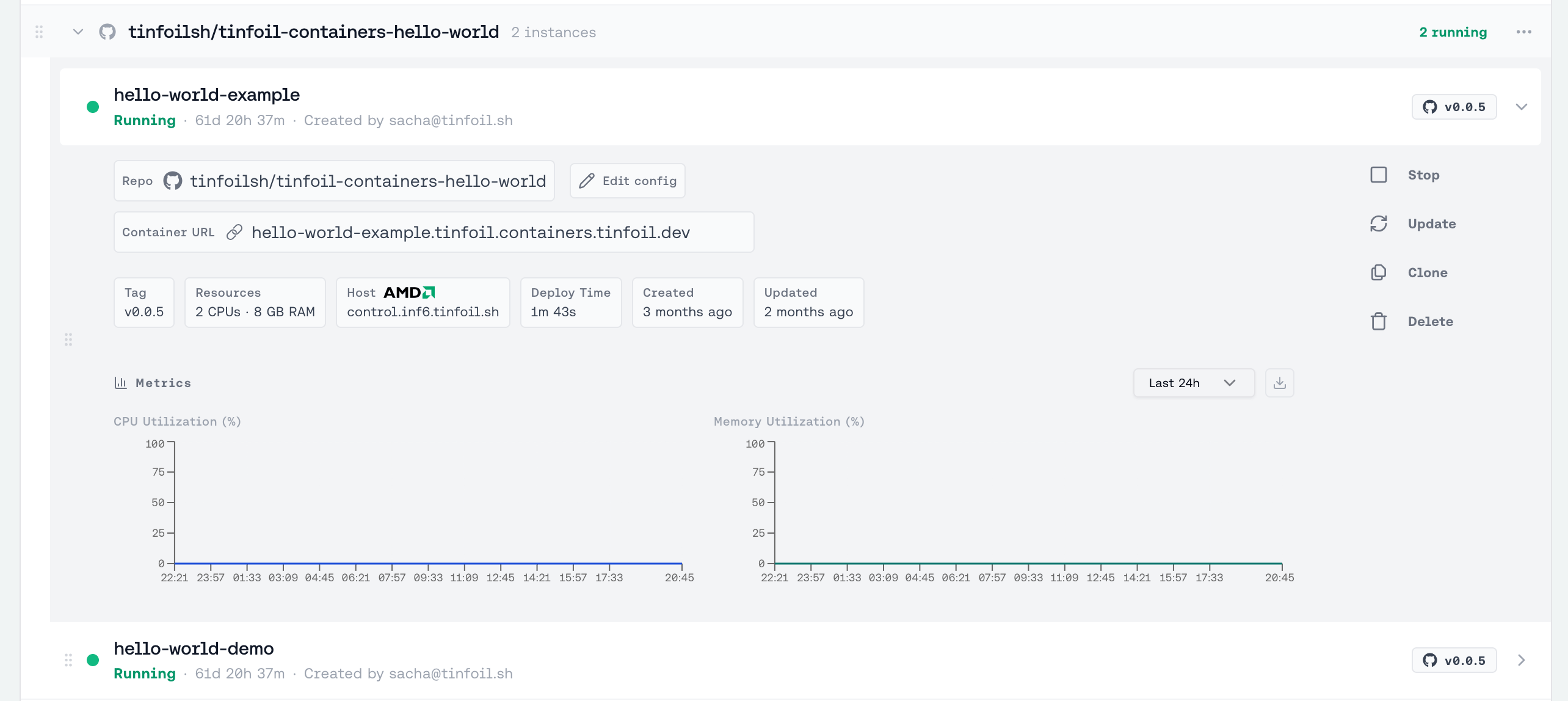
A **deployment** is a single GitHub repository. It stores shared settings and gives the dashboard and CLI one place to inspect or update those instances together.
 Each **container instance** in a deployment group is an independent enclave with its own name, status, resources, domain, and lifecycle. A deployment does not add load balancing or automatically update its instances when a release is published. The dashboard shows each deployment with aggregate counts for running, deploying, failed, and stopped instances.
 Repository-scoped secrets belong to this deployment namespace. They are available only to containers using that repository and move with it when the repository is renamed. If Tinfoil merges an existing destination namespace for the same repository, resolve duplicate secret names before the rename can complete. A destination belonging to a different repository is isolated and never merged.
## Inspecting a deployment
Use either the deployment UUID or its `owner/repo` name:
```bash theme={"dark"}
tinfoil deployment list
tinfoil deployment get owner/repo
```
Pass `-o json` for machine-readable output. To set the staging mode used by default for new instances and deployment-wide updates:
```bash theme={"dark"}
tinfoil deployment settings owner/repo --default-staging true
```
Manage secrets for the same repository with `tinfoil repo secret list owner/repo`. See [Secrets & environment variables](/containers/secrets-and-env-vars) for scope and naming rules.
See [Updating & lifecycle](/containers/updates#updating-a-repository-deployment) to update every instance, or a selected set, to the same release.
## Container lifecycle
Individual containers move through these backend states. The dashboard presents **Ready** as **Running**:
| Status | Description |
| ------------------- | --------------------------------------------------------------- |
| **Pending** | Deployment is queued |
| **Deploying** | Image is being pulled and the enclave is booting |
| **Started** | The enclave is running and startup checks are still in progress |
| **Ready / Running** | Container is live and serving traffic |
| **Failed** | Something went wrong — check your config and Docker image |
| **Stopping** | The deployment is shutting down |
| **Stopped** | The deployment is stopped but its saved configuration remains |
The dashboard polls for status updates automatically and updates the deployment counts.
For updating a running container, rolling back, canceling an in-progress update, or recovering from a failed update, see [Updating & lifecycle](/containers/updates).
## Stopping and starting a container
Open a container's actions in the dashboard and click **Stop** to shut down its enclave without deleting its saved configuration. Click **Start** to deploy it again with the saved settings. The start dialog also lets you select updated settings before deployment.
## Deleting a container
Click **Delete** on a container to permanently remove it. This:
* Stops the running enclave
* Cancels any in-progress update
* Deletes the container's secret bindings
* Removes the container from your org
Deletion is irreversible. The container's configuration, secret bindings,
and environment variables are permanently removed.
## Using the CLI
The [Tinfoil CLI](/containers/cli) exposes both deployment-level inspection and the individual container lifecycle:
```bash theme={"dark"}
tinfoil deployment list # repositories and instance counts
tinfoil deployment get owner/repo # one deployment
tinfoil container create my-api --repo owner/repo --tag v1.0.0
tinfoil container list # all containers in the org
tinfoil container get my-api # full detail (status, host, resources)
tinfoil container stop my-api # pause without deleting
tinfoil container start my-api # resume with saved config
tinfoil container delete my-api # permanent
```
See the [CLI reference](/containers/cli) for create flags, update controls, and scripting tips.
Repository-scoped secrets belong to this deployment namespace. They are available only to containers using that repository and move with it when the repository is renamed. If Tinfoil merges an existing destination namespace for the same repository, resolve duplicate secret names before the rename can complete. A destination belonging to a different repository is isolated and never merged.
## Inspecting a deployment
Use either the deployment UUID or its `owner/repo` name:
```bash theme={"dark"}
tinfoil deployment list
tinfoil deployment get owner/repo
```
Pass `-o json` for machine-readable output. To set the staging mode used by default for new instances and deployment-wide updates:
```bash theme={"dark"}
tinfoil deployment settings owner/repo --default-staging true
```
Manage secrets for the same repository with `tinfoil repo secret list owner/repo`. See [Secrets & environment variables](/containers/secrets-and-env-vars) for scope and naming rules.
See [Updating & lifecycle](/containers/updates#updating-a-repository-deployment) to update every instance, or a selected set, to the same release.
## Container lifecycle
Individual containers move through these backend states. The dashboard presents **Ready** as **Running**:
| Status | Description |
| ------------------- | --------------------------------------------------------------- |
| **Pending** | Deployment is queued |
| **Deploying** | Image is being pulled and the enclave is booting |
| **Started** | The enclave is running and startup checks are still in progress |
| **Ready / Running** | Container is live and serving traffic |
| **Failed** | Something went wrong — check your config and Docker image |
| **Stopping** | The deployment is shutting down |
| **Stopped** | The deployment is stopped but its saved configuration remains |
The dashboard polls for status updates automatically and updates the deployment counts.
For updating a running container, rolling back, canceling an in-progress update, or recovering from a failed update, see [Updating & lifecycle](/containers/updates).
## Stopping and starting a container
Open a container's actions in the dashboard and click **Stop** to shut down its enclave without deleting its saved configuration. Click **Start** to deploy it again with the saved settings. The start dialog also lets you select updated settings before deployment.
## Deleting a container
Click **Delete** on a container to permanently remove it. This:
* Stops the running enclave
* Cancels any in-progress update
* Deletes the container's secret bindings
* Removes the container from your org
Deletion is irreversible. The container's configuration, secret bindings,
and environment variables are permanently removed.
## Using the CLI
The [Tinfoil CLI](/containers/cli) exposes both deployment-level inspection and the individual container lifecycle:
```bash theme={"dark"}
tinfoil deployment list # repositories and instance counts
tinfoil deployment get owner/repo # one deployment
tinfoil container create my-api --repo owner/repo --tag v1.0.0
tinfoil container list # all containers in the org
tinfoil container get my-api # full detail (status, host, resources)
tinfoil container stop my-api # pause without deleting
tinfoil container start my-api # resume with saved config
tinfoil container delete my-api # permanent
```
See the [CLI reference](/containers/cli) for create flags, update controls, and scripting tips.